
From EncyclopAtys
m |
m |
||
| (14 intermediate revisions by 2 users not shown) | |||
| Line 1: | Line 1: | ||
{{TIP|DE=|EN=2|ES=|FR=0|RU=}} | {{TIP|DE=|EN=2|ES=|FR=0|RU=}} | ||
{{Trad|EN=RC/Channel Management|FR=RC/Gestion de ses canaux}} | {{Trad|EN=RC/Channel Management|FR=RC/Gestion de ses canaux}} | ||
| + | The big advantage of [[RC]] is that you can create as many private channels as you want. Here we show the creation of a private channel, the user rights, the discussions (under a channel). | ||
| + | To [[Chat/RC FAQ]]. | ||
| + | == [[File:RC priv icon.png|19px|frameless|left]] Create an channel == | ||
| + | We can only create private channels. | ||
| + | https://rocket.chat/docs/user-guides/channels/ | ||
| + | |||
| + | == [[File:RC discussion icon 2020-04-03.png]] Discussions == | ||
| + | New feature. <br /> | ||
| + | Helps keep track of what's going on! When creating a discussion, a sub-channel from the one you selected is created and the two are linked. | ||
| + | |||
| + | This allows, under a channel, to create as a sub-section, e.g. to ask a question. | ||
| + | |||
| + | '''Caution''': we can access a channel, even when not invited in the (parent) private channel. | ||
| + | |||
| + | == roles and permissions== | ||
| + | When you create a private channel, you have to invite your friends to it (usually when you create the channel) - otherwise they won't find the channel (hidden in the search). | ||
| + | |||
| + | * To add (later, once the channel is created) more homins: in the channel menu (top right), open the users and use the bottom button Invite users | ||
| + | * To add ''permissions'' to a guest user: in the channel menu (top right), open the users and use the menu on their right <code><big><big>⢰ </big></big></code>. | ||
| + | ** For friends to be able to invite others, you must make them the "owner" of the channel. | ||
| + | ** If they are set to ''leader'' and they are not in RC (or invisible), a line at the top indicates their absence, with a button to chat with them in private. | ||
| + | |||
| + | <gallery> | ||
| + | FR RC Info user owner leader 2019-06-09.png|See the roles of a user in the channel: top right Member list | ||
| + | RC leader css1 2019-06-09.png|A channel '''leader''' is missing from RC, a message at the top of the channel | ||
| + | </gallery> | ||
| + | |||
| + | |||
| + | About '''roles''' | ||
| + | |||
| + | A '''moderator''' can: | ||
| + | * change/correct all messages | ||
| + | * use pinned feature (to add an important message on top of he room) | ||
| + | * use @all | ||
| + | |||
| + | |||
| + | * In order for your friends to be able to invite others, you have to make them the '''owner''' of the channel. | ||
| + | |||
| + | * If they are set as '''leader''' and they are not in RC (or invisible), a line at the top indicates their absence, with a button to chat with them in private. | ||
| + | |||
| + | == search == | ||
| + | https://rocket.chat/docs/user-guides/channel-actions/#search-messages | ||
== Notes and links == | == Notes and links == | ||
| Line 13: | Line 55: | ||
{{clear}}{{Last version link}} <noinclude> | {{clear}}{{Last version link}} <noinclude> | ||
| − | {{Portal| | + | {{Portal|Archives}} |
| − | [[Category: | + | [[Category:Obsolete]] |
| − | |||
| − | |||
| − | |||
| − | |||
| − | |||
</noinclude> | </noinclude> | ||
Latest revision as of 00:16, 22 April 2026
 Translation Status → This page is one of the 25 we would like to see translated into English. Translation Status → This page is one of the 25 we would like to see translated into English.
|
 Unübersetzt • Unübersetzt •  Translation in progress • Translation in progress •  No traducido • No traducido •  Original • Original •  Не переведено Не переведено
|


The big advantage of RC is that you can create as many private channels as you want. Here we show the creation of a private channel, the user rights, the discussions (under a channel).
To Chat/RC FAQ.
 Create an channel

We can only create private channels.
https://rocket.chat/docs/user-guides/channels/
 Discussions

New feature.
Helps keep track of what's going on! When creating a discussion, a sub-channel from the one you selected is created and the two are linked.
This allows, under a channel, to create as a sub-section, e.g. to ask a question.
Caution: we can access a channel, even when not invited in the (parent) private channel.
roles and permissions
When you create a private channel, you have to invite your friends to it (usually when you create the channel) - otherwise they won't find the channel (hidden in the search).
- To add (later, once the channel is created) more homins: in the channel menu (top right), open the users and use the bottom button Invite users
- To add permissions to a guest user: in the channel menu (top right), open the users and use the menu on their right
⢰.- For friends to be able to invite others, you must make them the "owner" of the channel.
- If they are set to leader and they are not in RC (or invisible), a line at the top indicates their absence, with a button to chat with them in private.
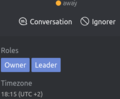
See the roles of a user in the channel: top right Member list

A channel leader is missing from RC, a message at the top of the channel


About roles
A moderator can:
- change/correct all messages
- use pinned feature (to add an important message on top of he room)
- use @all
- In order for your friends to be able to invite others, you have to make them the owner of the channel.
- If they are set as leader and they are not in RC (or invisible), a line at the top indicates their absence, with a button to chat with them in private.
search
https://rocket.chat/docs/user-guides/channel-actions/#search-messages
Notes and links
Official site: https://rocket.chat/